The modern WMS for Shopify Plus apparel brands.
For brands shipping 1,000 to 50,000 orders a month who need a system built around size and colour variants.
OptiWMS is warehouse management software built around how apparel brands on Shopify Plus actually work. Size and colour variants, high-velocity seasonal picks, shipping labels created at pack time on your own carrier accounts, and a desktop print client that manages every thermal printer on the floor. Set up in days, train a floor operator in an afternoon, and run a wave end to end without an admin in the loop.
14 days, full access, no credit card required.

Your warehouse runs on variants. Most WMS tools were not designed around that.
A size/colour variant catalogue is not a flat list of SKUs. When you have 50 active styles with 8 sizes and 5 colours each, the questions your ops lead asks at 8am are not about total on-hand. They are about which specific size and colour combinations are running short, which styles are burning through stock faster than forecast, and which units in that back-left bin need to move first.
OptiWMS tracks every pick, receive, adjustment, and return at the variant level. The pick queue tells each operator exactly which size, which colour, and which bin. The reports answer the apparel-specific questions without a spreadsheet in the middle.

One plan covers the full warehouse cycle
Every OptiWMS plan includes the full feature set: pick and pack workflows, inventory management, cycle counts, 8 reports, and the Print Hub print client. One monthly subscription, everything included.
Pick, pack, and dispatch
- ✓Wave-based pick queues route operators in bin order so every step closes on the next pick rather than backtracking.
- ✓Batch up to hundreds of orders into a single wave, assign pickers to zones, and the queue handles the rest.
- ✓FIFO and FEFO rotation enforced at the line level. The pick queue tells the operator which exact unit to take and in what order.
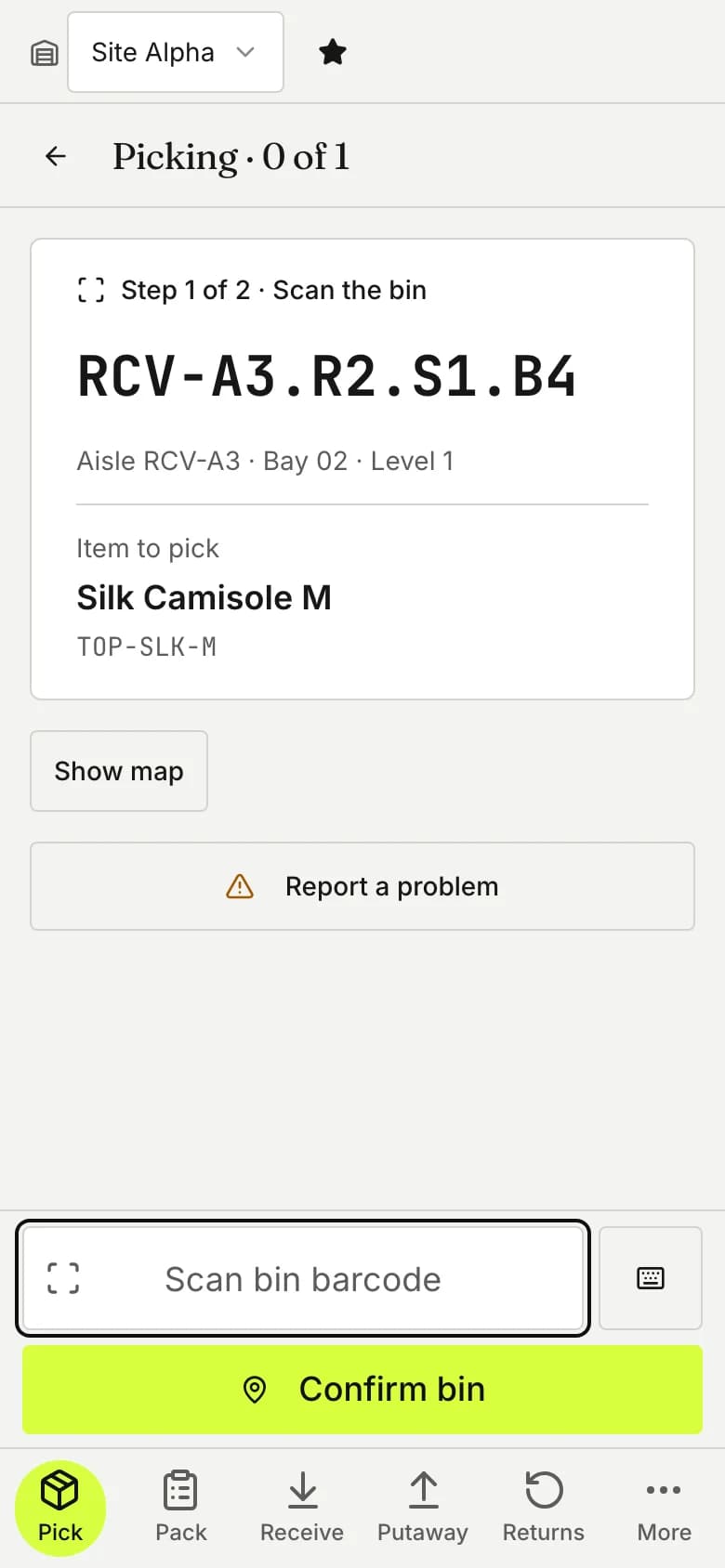
- ✓Mobile operator UI runs as a browser-based PWA. Open the URL on any phone or tablet and start picking.
Receiving and inventory
- ✓Receive supplier deliveries against purchase orders with barcode scanning. Shortages, overages, and damaged stock flagged in real time.
- ✓Full inventory ledger. Every pick, adjustment, receive, and transfer is logged with the operator name and timestamp.
- ✓Cycle counts by product group or zone, driven from the mobile app.
- ✓Multi-warehouse support. Zones, bin locations, and cross-warehouse stock transfers are part of the base product.
Direct carrier integrations
OptiWMS connects directly to your own carrier accounts, creates the shipment at pack time, and generates the shipping label, so your team stays on the carrier relationships and rates you have already negotiated. Australia Post covers domestic Australia, and DHL Express, FedEx, and UPS handle international and overseas-domestic shipping. The label is queued to your thermal printer automatically.
OptiWMS Print Hub - included
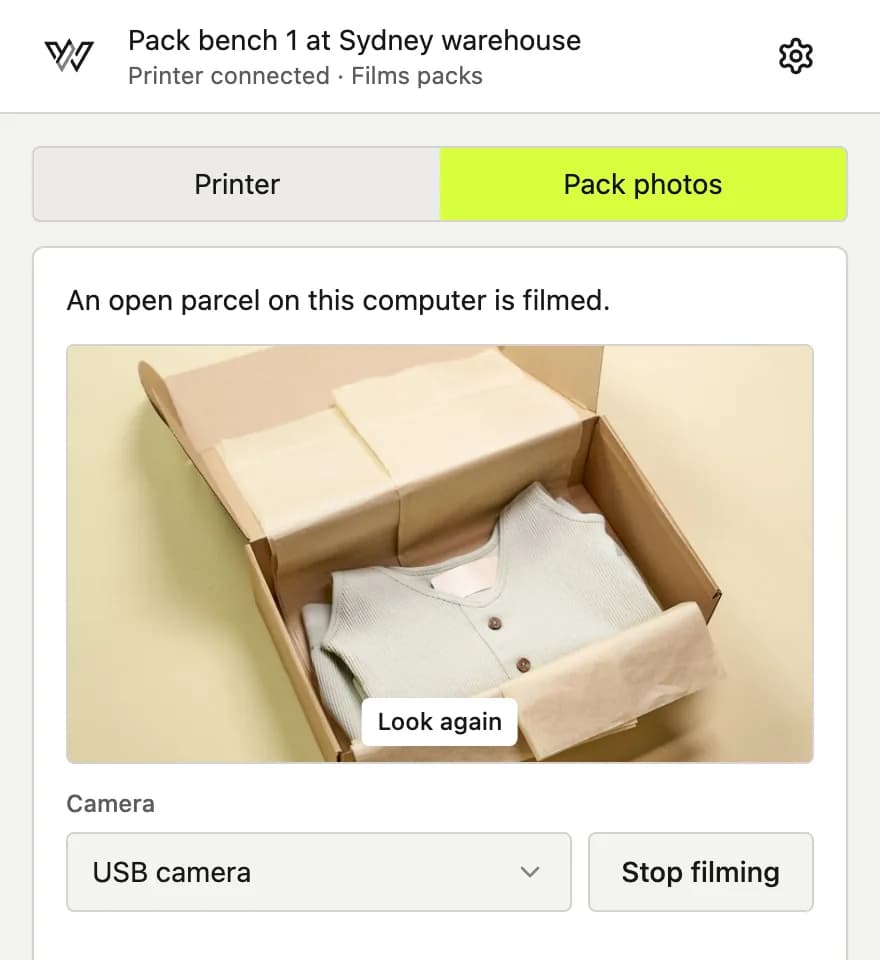
A desktop app for macOS and Windows connects your thermal and label printers to OptiWMS. Pair a workstation once and it stays connected through restarts and power-cycles. ZPL labels queue centrally with retries and visibility, so a jammed printer holds its jobs and catches up when it comes back online.
Reports
8 reports that map to what a warehouse manager and buying team actually do with data
Every report answers an apparel-specific question your team faces each week - reorder decisions, sell-through rates, slow movers, stock discrepancies, and supplier reliability. Read them on screen or download a CSV.
| Report | What it answers |
|---|---|
| Low Stock | Which variants have crossed the reorder threshold right now |
| Days of Supply | How long each SKU will last at current sales velocity |
| Sell-Through | Which styles are moving fast and which are turning to dead stock |
| Inventory Aging | Stock that has sat still for 30, 60, 90+ days |
| Stock Movement | Where inventory went - picks, adjustments, transfers |
| Cycle Count Accuracy | Variance by zone and product group |
| Labour Productivity | Picks and packs per operator per shift |
| Supplier Performance | On-time delivery and receive accuracy per supplier |

Connected and running before the week is out
Most brands ship their first real order through OptiWMS within a day of starting setup. The slowest steps are the ones with external dependencies: getting your carrier account credentials in hand and booking IT time to lock down the pack-bay PC.
Sign up and your tenant is ready in minutes.
Import your product catalogue via CSV. Variants sharing a style code are grouped into a single product on upload.
Connect Shopify and new orders flow straight into your pick queue.
Set up your warehouse layout - zones, locations, bin labels. Enter opening stock as you map each bin.
Install the OptiWMS Print Hub on your pack-bay PC. Pair your thermal printer by scanning a QR code. Print a test label to confirm it is working.
Connect your carrier accounts (Australia Post, DHL Express, FedEx, UPS) with your own credentials.
Run a synthetic test order through pick, pack, and label. When it completes, you are ready for live traffic.
Built for the way apparel warehouses work
Variant-level pick queues
Pick lines are specific: style, size, colour, bin, quantity, in FIFO order. A picker handling a wave of 30 orders never has to interpret an ambiguous SKU code. The mobile screen shows the variant name in plain language ("Navy / Medium"), the bin location, and the quantity. Scan to confirm. Move to the next.
Sell-through and days of supply at variant level
The sell-through report shows what percentage of opening stock has shipped, broken down to variant level. The days-of-supply report shows how long each variant will last at current velocity. Sort by days-of-supply ascending and the reorder decisions surface themselves.
Cycle counts by product group
Count one season's active range this month, count another group next month. The mobile app drives the count, discrepancies flag immediately, and the ledger adjusts on confirmation. No spreadsheet handoff between your floor team and your inventory manager.
OptiWMS Print Hub
Print Hub is bundled with every OptiWMS plan.
OptiWMS Print Hub is a desktop app that runs on the pack-bay PC, connects directly to your thermal printers over USB or TCP/IP, and drives the label queue from the same platform as everything else. Label printing is part of the subscription at any volume, with no separate per-label or service fee.
Pair once, stays connected
Pair a workstation by scanning a QR code from the OptiWMS admin. The agent detects the connected printers, prints a test label, and stays connected in the background through restarts and power-cycles.
Managed label queue with retries
Each label job queues centrally. If the printer jams or goes offline, the jobs hold and process when it comes back. The admin dashboard shows each connected workstation and printer with its current status.
No per-label fee
Print as many labels as you ship at no extra cost. Supported printers: Zebra thermal printers over USB and TCP/IP, with additional models on request.

One plan, the full feature set
Every feature is in every account. Pricing scales with your order volume, warehouses, and users, so you only pay for the size of your operation.
See pricingSee it running on your own catalogue.
Start a trial and we will set up a sandbox tenant with seeded apparel inventory - size/colour variants, open orders, and a connected Shopify store. Run the pick-pack-print cycle before you commit a cent. Or book a 30-minute demo and we will walk you through a live tenant with your actual catalogue after you connect your store.
Questions? Email [email protected] - we reply within one business day.